







PowerPoint Viewer设置去除拼写错误检查的操作教程

2019-09-27 11:35:08来源:下载之家作者:xzwh

PowerPoint Viewer 2003

PowerPoint Viewer 2003

软件类型:办公软件 软件大小:5.69MB 软件平台:  PC  软件语言:简体中文

标签: PowerPoint Viewer 2003

查看详情

      今天给大家讲的是PowerPoint Viewer设置去除拼写错误检查方法,对PowerPoint Viewer设置去除拼写错误检查感兴趣的同学们就一起学习下具体方法吧!

      PowerPoint Viewer设置去除拼写错误检查的操作教程

PowerPoint Viewer设置去除拼写错误检查的操作教程

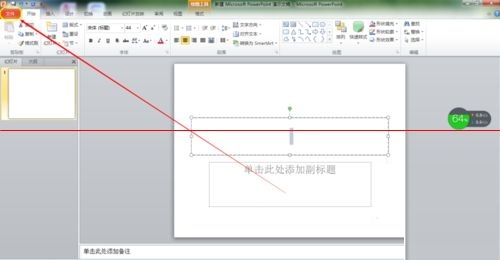
      我们先打开PowerPoint Viewer软件,需要我们打开一个文件,快速双击或者右键打开也可以

      然后进入页面后,浏览选项卡一栏,找到文件选项卡,单击进入
PowerPoint Viewer设置去除拼写错误检查的操作教程

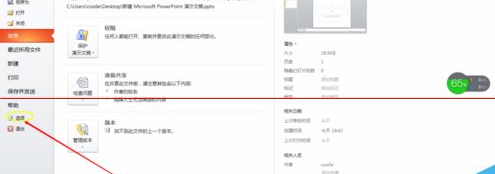
      这时候进入如图所示的页面,浏览页面左侧一方,找到帮助下方的选项,单击进入

PowerPoint Viewer设置去除拼写错误检查的操作教程

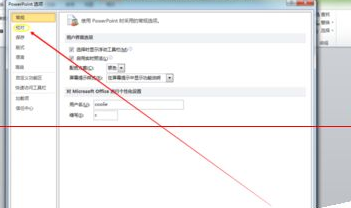
      弹出PowerPoint选项对话框,找到校对,单击进入

PowerPoint Viewer设置去除拼写错误检查的操作教程

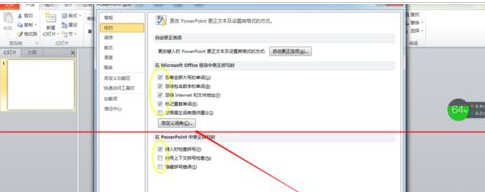
      最后通过去掉勾选的对号,设置去除错误拼写检查,然后单击对话框左下角的确定,设置就成功了
PowerPoint Viewer设置去除拼写错误检查的操作教程

      看完了上文为你们讲解的PowerPoint Viewer设置去除拼写错误检查的具体流程介绍,你们是不是都学会了呀!